Introduction
In the past, manually deploying a single highly available Apollo cluster and verifying it typically took 1 to 2 business days. Now, 24 clusters can be deployed in a single business day (7 hours) – each taking only 18 minutes – and every cluster is production-ready. How was this achieved?
TL;DR
- Unified development environment based on VSCode
- Matching test environment based on libvirtd
- Encrypted communication virtual LAN between private GitLab and production server clusters via WireGuard
- Multi-branch development workflow based on GitLab
- Automated operations code synchronization based on GitLab CI
Unified Development Environment & Reproducible Test Environment
In our office area data center, there is a Linux physical server that I use as the unified development environment. All Ansible code is written by connecting to this physical server via VSCode Remote Development. Below are the two common access methods:
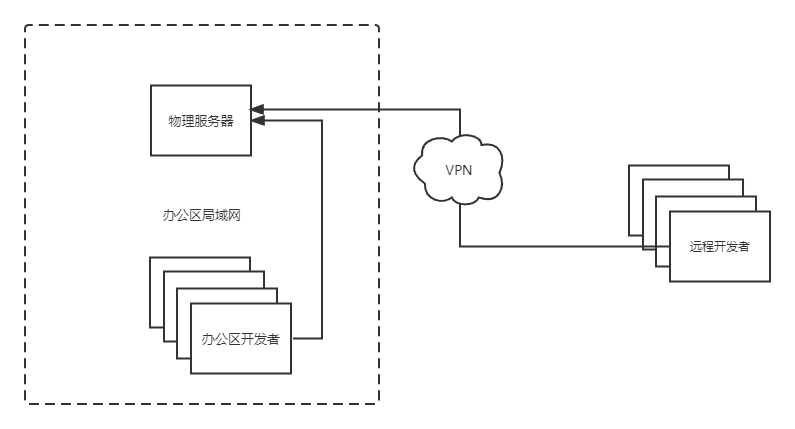
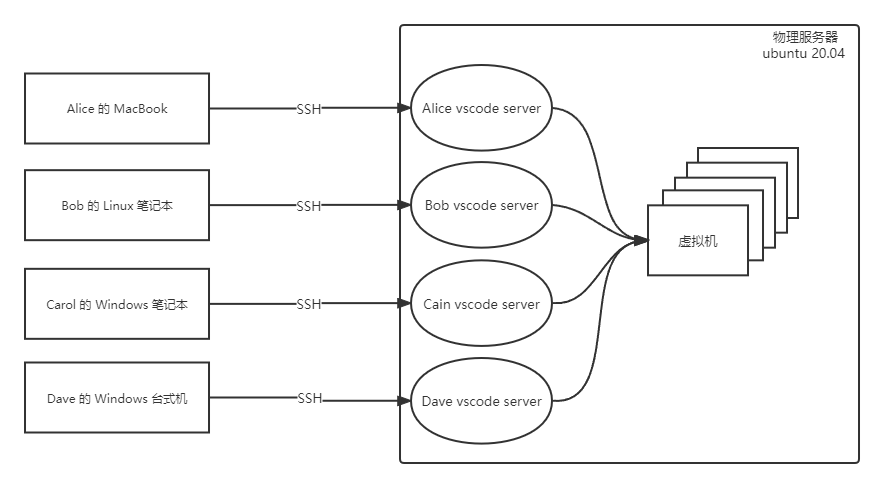
Each developer has their own regular Linux user account. Developers only need to install VSCode on their own machines and connect to the physical server via SSH using the VSCode Remote Development extension and their own server account. VSCode runs a VSCode Server process under each developer’s user, and since all VSCode instances actually run on the same physical server, every developer has an Ansible development environment identical to mine.
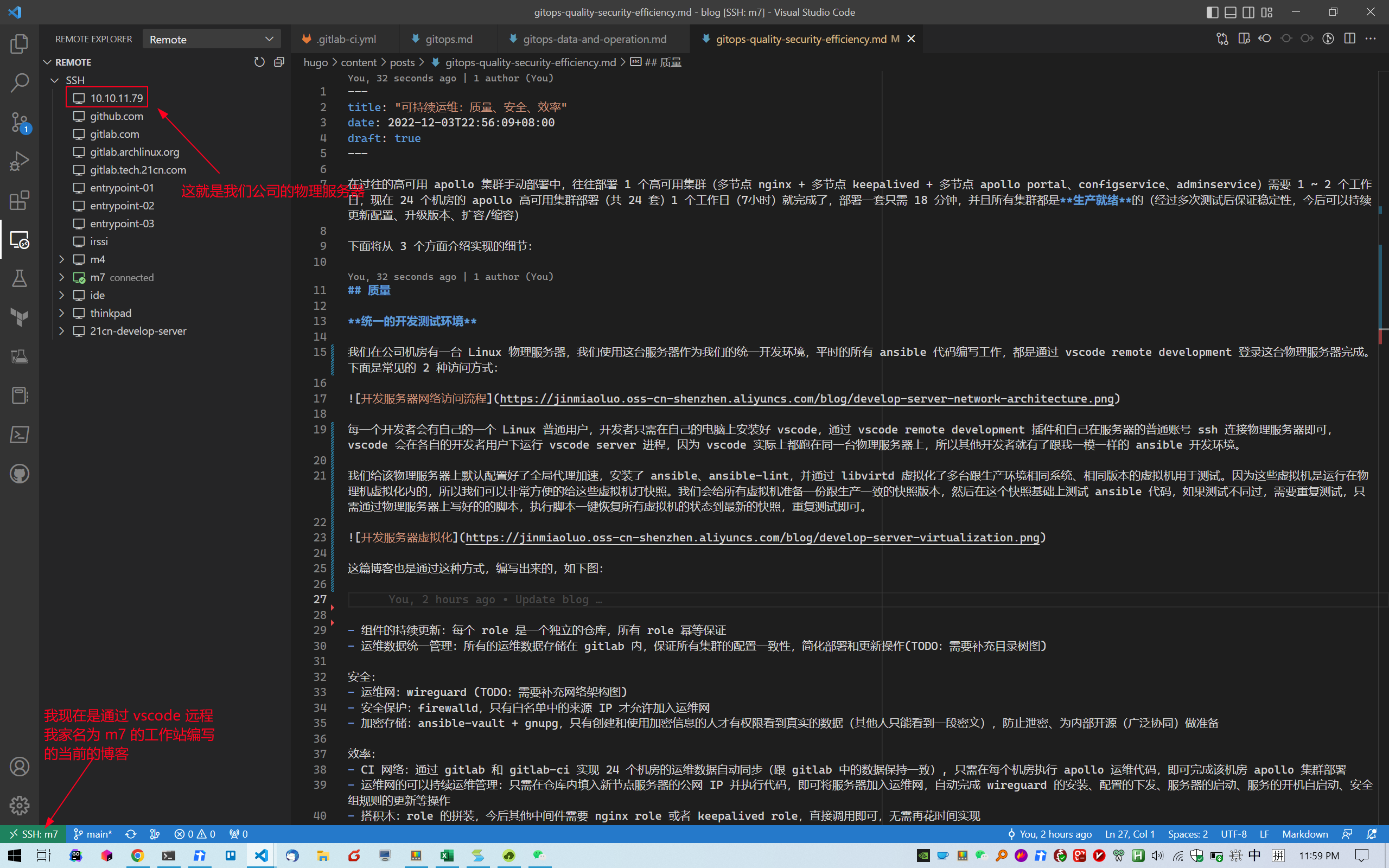
This blog post was also written via VSCode Remote Development, as shown below:
I pre-configured global proxy acceleration on the physical server, installed Ansible and ansible-lint, and used libvirtd to create multiple virtual machines running the same OS and version as the production environment for testing. Since these VMs run inside the physical server’s hypervisor, taking snapshots is extremely convenient. I prepared a snapshot for all VMs that matches the production state, then test Ansible code on top of that snapshot. If tests fail and need to be repeated, I simply run a pre-written restore script on the physical server to revert all VMs to the latest snapshot state, then re-run the tests.
With these preparations in place, high-frequency Ansible development and testing becomes possible, ensuring highly compatible and reliably stable Ansible code.
In the future, our production servers will gradually transition from CentOS to openEuler. By setting up openEuler VMs and conducting frequent Ansible code compatibility testing, we can achieve a smooth transition from CentOS to openEuler.
WireGuard-Based Operations Network
This section does not fully reflect the actual setup
Our company’s GitLab instance is on the office intranet, but production servers are distributed across self-built data centers in all 34 provincial-level administrative regions of China. We store all operations code in GitLab, then automatically synchronize it to the management server in each data center via CI. The relevant operations staff then log into the management servers and execute Ansible playbooks. To achieve high-quality, high-efficiency infrastructure as code, secure communication between GitLab and each data center’s management server is essential.
We currently use a WireGuard Point-to-Sites network architecture, as shown below:
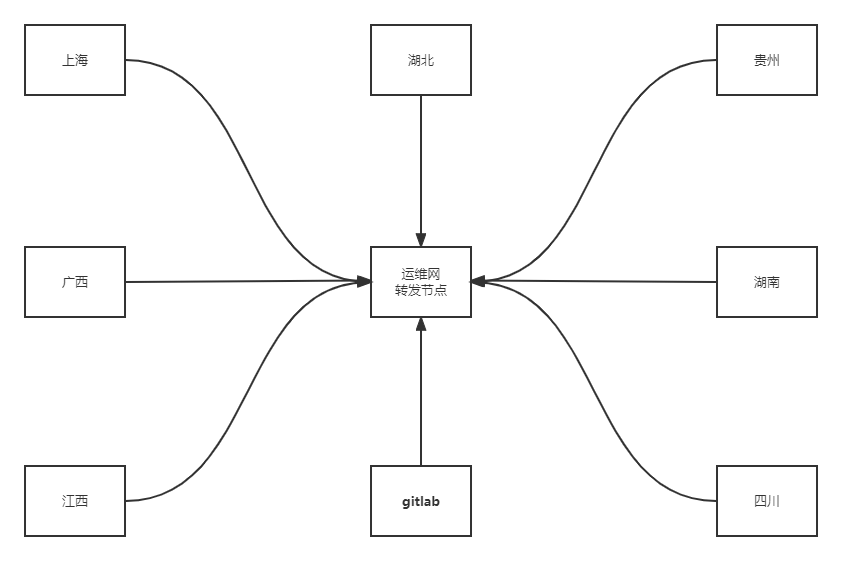
The operations network relay node is the center of the entire network. It runs WireGuard as a server and has a public IP (say, 1.2.3.4). Each province has one operations management server that triggers ansible-playbook runs, running WireGuard as a client with outbound internet access (able to ping 1.2.3.4). Each server that joins the network gets an additional virtual network interface with an IP in the 10.188.188.0/22 range. All hosts within the network can communicate with each other via their 10.188.188.0/22 IPs.
For security, the relay node uses firewalld to restrict source IPs – only the provincial management servers are allowed to access the relay node, mitigating security risks.
We add the GitLab server as one of the clients in the operations network, also with a 10.188.188.0/24 IP. GitLab Runner is installed on each management server and registers itself with GitLab via this IP, enabling cross-province automated operations.
GitLab Multi-Branch Collaboration
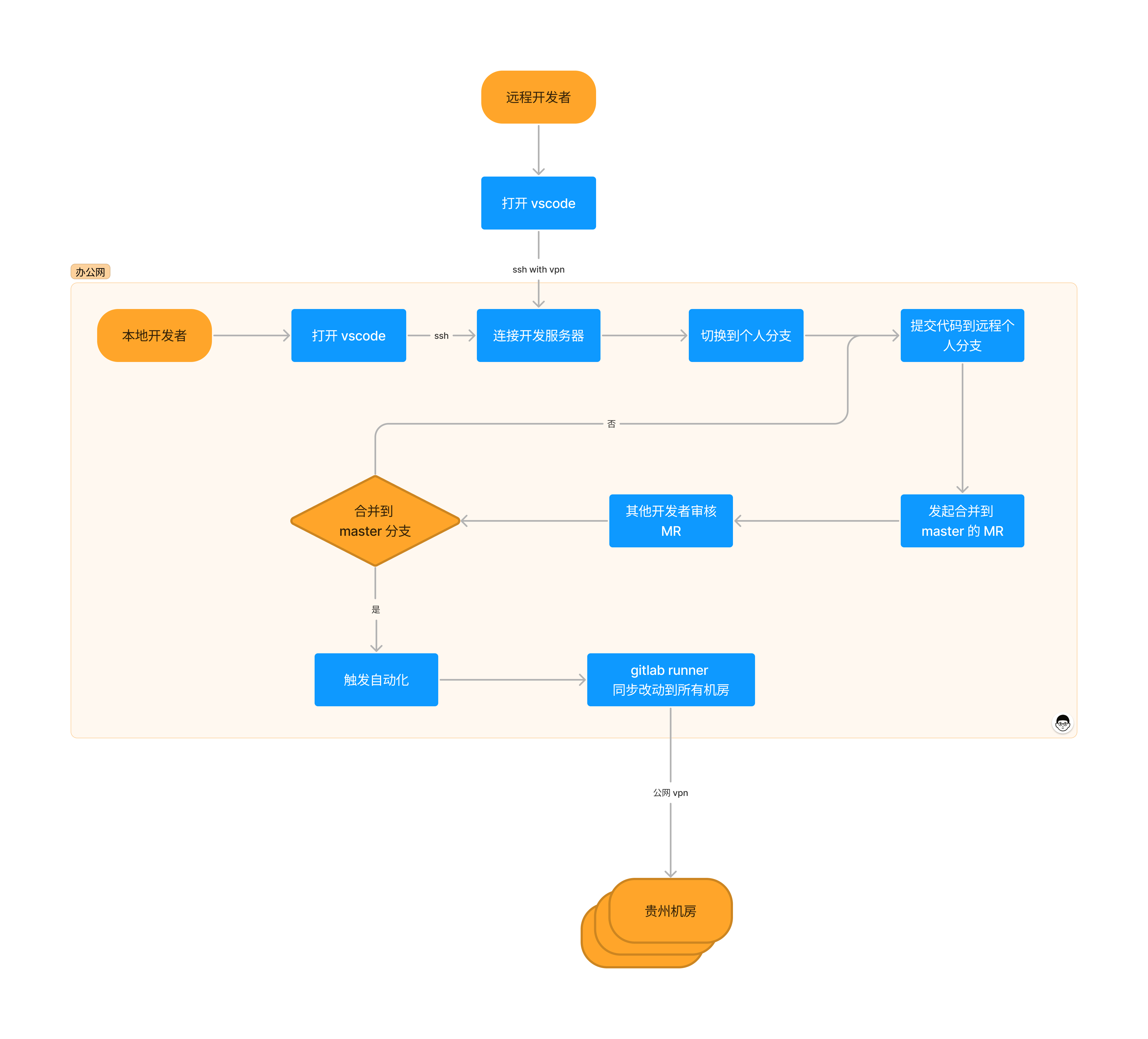
Our development workflow is based on GitLab multi-branch collaboration. Each developer has a branch named after themselves and stays in sync with the latest master branch using:
git pull --rebase --autostash origin master
We use a Fast Forward merge strategy to keep the git history clean and simple.
All our operations code is stored in a single repository called infrastructure. The code is divided into operations and data. Operations are abstracted as Ansible roles and committed to GitLab for reuse. Data is further categorized into sensitive and non-sensitive data. Sensitive data is encrypted before being committed to GitLab, using GnuPG + ansible-vault. The GnuPG private key is available on the unified development environment and on each data center’s management server. When editing sensitive data during development, simply run:
ansible-vault decrypt group_vars/vault_example.yml
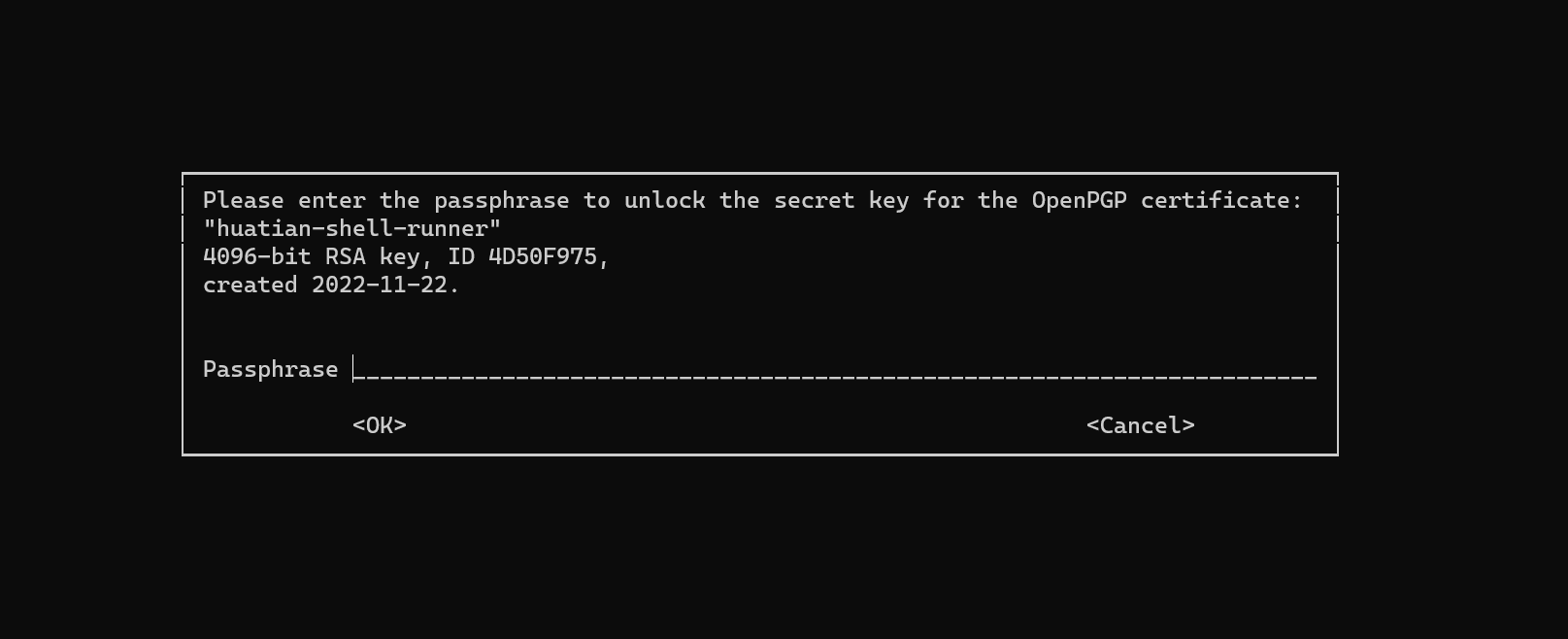
This triggers a GnuPG prompt for password authentication (only those who know the password can execute Ansible playbooks):
After editing, run:
ansible-vault encrypt group_vars/vault_example.yml
Re-encrypt the file and commit it to GitLab.
When running an Ansible playbook, the GnuPG decryption prompt is also triggered automatically. Enter the correct password and the playbook executes successfully.
Since sensitive data in the infrastructure-as-code repository is encrypted, we can open the operations code to the entire company, achieving secure and transparent sharing of operations infrastructure and architecture internally.
Automated Operations Code Synchronization
Operations code that has been reviewed and merged into the master branch is considered mature and triggers a GitLab CI pipeline to automatically synchronize the code to all data center management servers, as shown below:
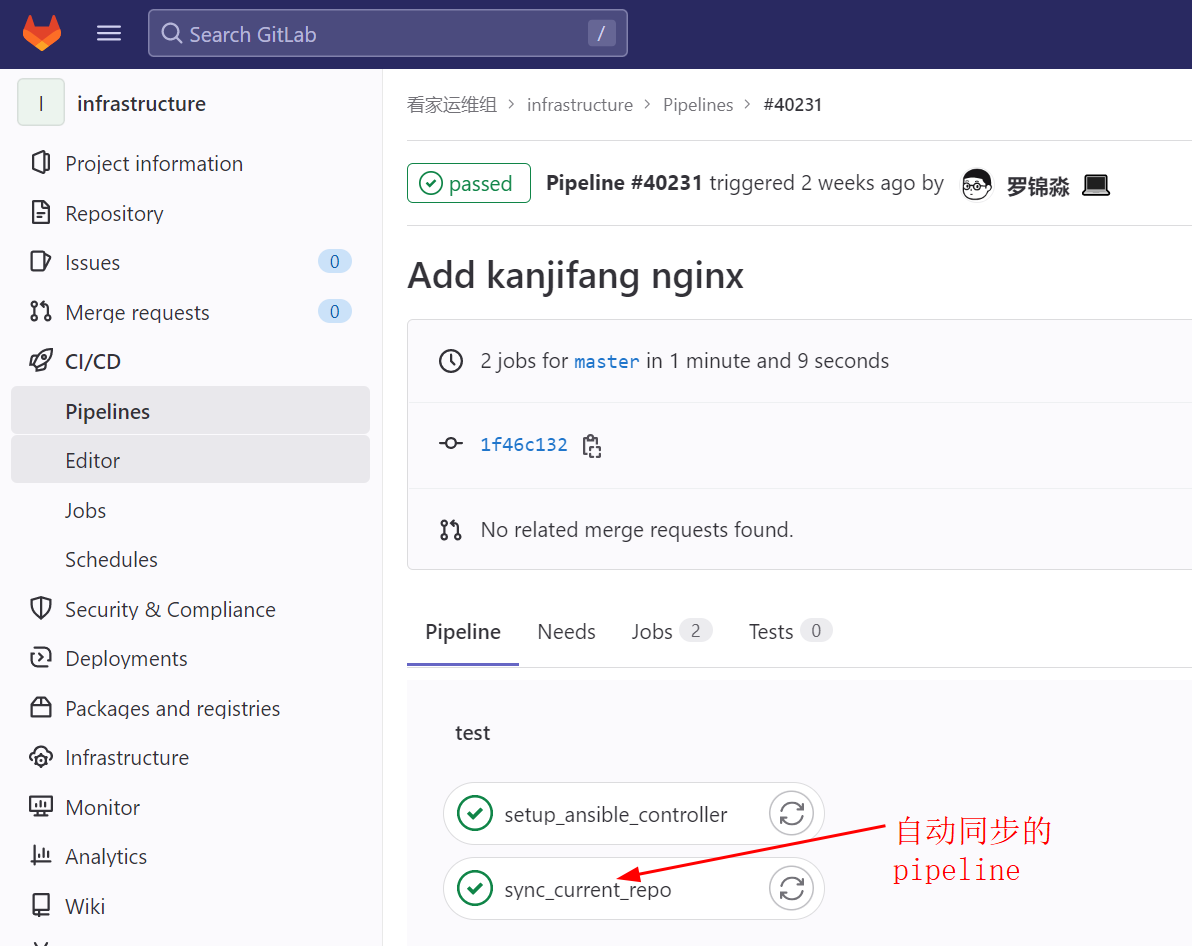
Operations staff log into each data center’s management server and execute the relevant Ansible playbooks to manage all servers as code via the intranet.
Finally, here is the development workflow diagram: