Preface
This article is a set of notes from reading the code used by the Arch Linux team to deploy, manage, and integrate their Identity and Access Management (IAM) service. It covers:
- How to deploy and manage a Keycloak service: Ansible
- How to manage users and permissions in Keycloak: Terraform
- How to integrate a web application with Keycloak: OAuth2.0, OIDC, Python, Authlib
- How to implement permission management based on information from Keycloak: decorators and enum classes
IAM Service
What Is It For
Let’s first consider what problems arise without an IAM service.
A typical team uses multiple services, such as GitLab, Jira, Confluence, MatterMost, Grafana, Kibana, Argo, etc. This creates several issues:
- When a team member joins or leaves, accounts must be created or deleted on every service
- When a team member uses a service, they must enter credentials on each one separately
- Each team member must manage passwords for multiple services; if a password is leaked and reused across services, it must be changed manually on each one
What an IAM service provides:
- Centralized permission management. The authorization server can manage user access to all applications – for example, which users can access which applications, what roles and permissions users have in each application, and user account creation and deletion only needs to be done once.
- Single sign-on. Users only need to log in once on the authorization server to access all applications connected to it. This improves user experience and reduces the burden of remembering multiple credentials.
- Reduced business complexity. The authorization code flow separates authentication logic from business code. Business code only needs to update and manage user permission tables based on user information obtained through OAuth2.0 and OIDC, without implementing 2FA, CAPTCHA, or other verification logic in every service.
- Foundation for microservice architecture. Microservices aim to split business logic into independent small services (with independent databases) to reduce complexity and improve fault tolerance and scalability. IAM provides centralized, unified authentication and permission management for each microservice, enabling security, reducing redundant verification overhead, and improving system maintainability and scalability.
What Is Keycloak
Keycloak is an open-source identity authentication and authorization service by RedHat. By deploying Keycloak, you can have your own IAM service. The Arch Linux team’s IAM service is built on Keycloak.
Deploying Keycloak
The Arch Linux team deploys and manages Keycloak using Ansible. The relevant Playbook and Role can be found here:
About Playbooks and Roles: The Arch Linux team uses Ansible and Terraform for Infrastructure as Code, not as automation tools.
Infrastructure as Code means: placing operational procedures into Git just like business code, managing operations through traditional development workflows. Developers manage servers the way they manage code (operations as code), including visibility into the details of all past changes on a server.
Back to Ansible. An Ansible Role (a folder with a fixed directory structure) is an abstraction for a category of middleware or operations, for example:
- common role: server initialization
- firewalld role: firewall rule configuration
- sshd role and root_ssh role: sshd configuration management and user public key certificate management
- prometheus-exporters role: installing node-exporter for basic server monitoring data exposure
- nginx role: Nginx deployment and configuration management
- certbot role: automated Let’s Encrypt certificate issuance and renewal
- postgres role: PostgreSQL deployment and management
- keycloak role: Keycloak deployment and management
- borg_client role: backup system integration for daily automatic server backups
- fail2ban role: brute-force attack defense; for example, if a user fails SSH login 5 times within 15 minutes, their public IP is blacklisted for one day
- promtail role: log system integration, collecting journald, pacman, nginx, and other logs into Loki
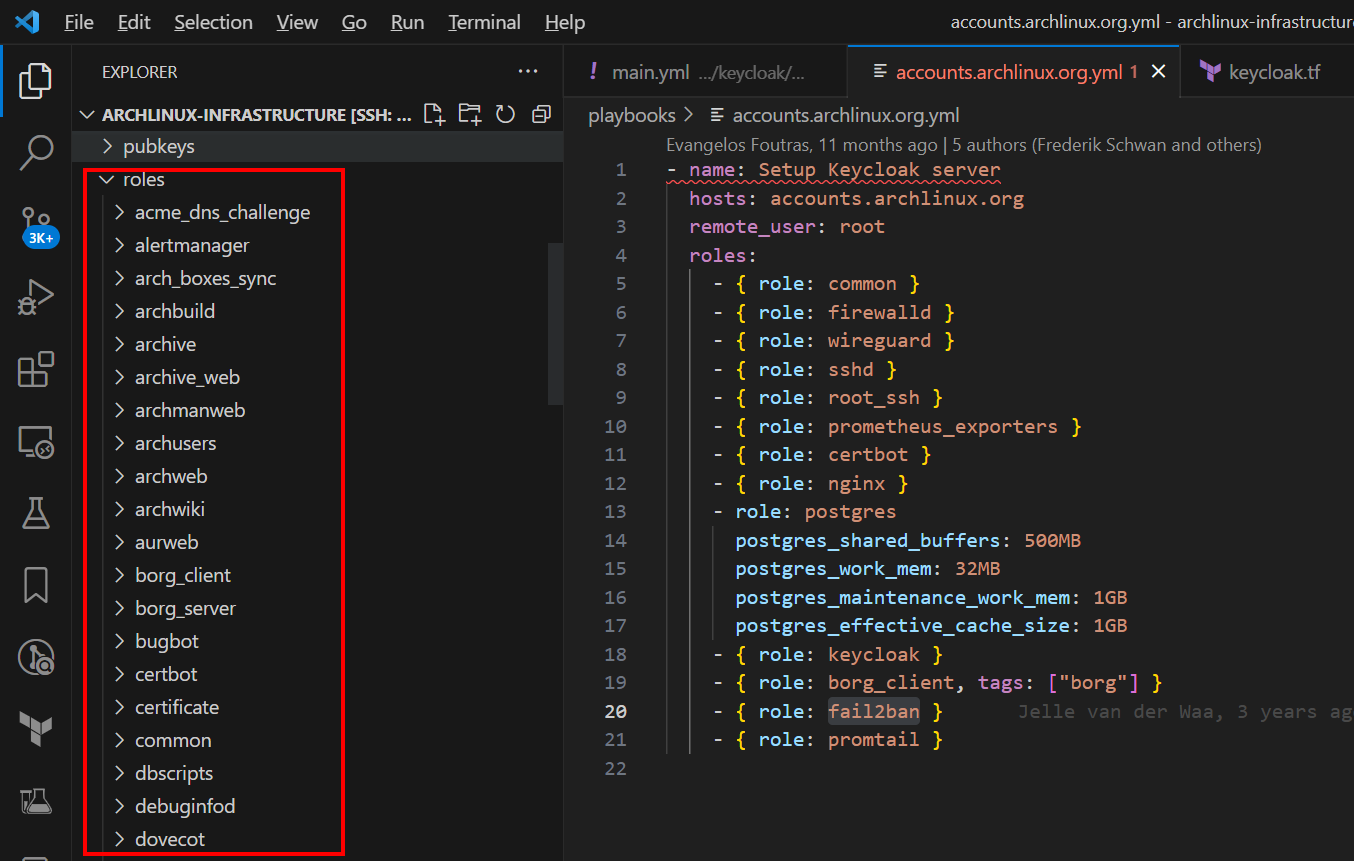
An Ansible Playbook (a single file) corresponds to a service. If a Role is an abstraction of a specific operation, a Playbook selects which Roles to use and assembles them like building blocks.
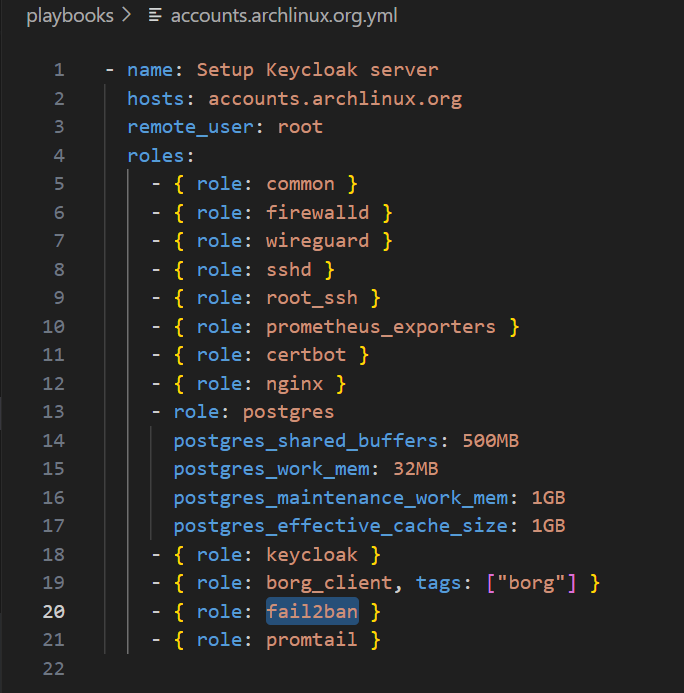
By using the same Roles across Playbooks, operational code can be reused, improving consistency. For example, all servers share the same common role, ensuring that initialized servers are identical.
The Keycloak deployment steps are as follows (corresponding to the functionality of each role):
- Initialize the server
- Initialize the SSH service and add developer public keys for server access
- Configure the firewall
- Configure host monitoring
- Deploy Nginx, PostgreSQL, and Keycloak with HTTPS certificate configuration
- Configure backups, rate limiting, and log collection
It is precisely because the Arch Linux team has implemented such mature Infrastructure as Code that I had the opportunity to study how they built their IAM service (specific details are not expanded here; see the code in the repository).
Managing Keycloak
The Arch Linux IAM service URL is: https://accounts.archlinux.org/
All information in Keycloak is managed through Terraform, including:
- User groups (similar to Linux user groups)
- OIDC configurations for different applications (GitLab, Grafana, etc.)
- Authentication flows (username/password login, 2FA, WebAuthn, etc.)
Link: keycloak.tf
Example: Managing Group Information with Terraform
Terraform code for defining group information: Terraform code

Example: Managing OIDC Configuration with Terraform
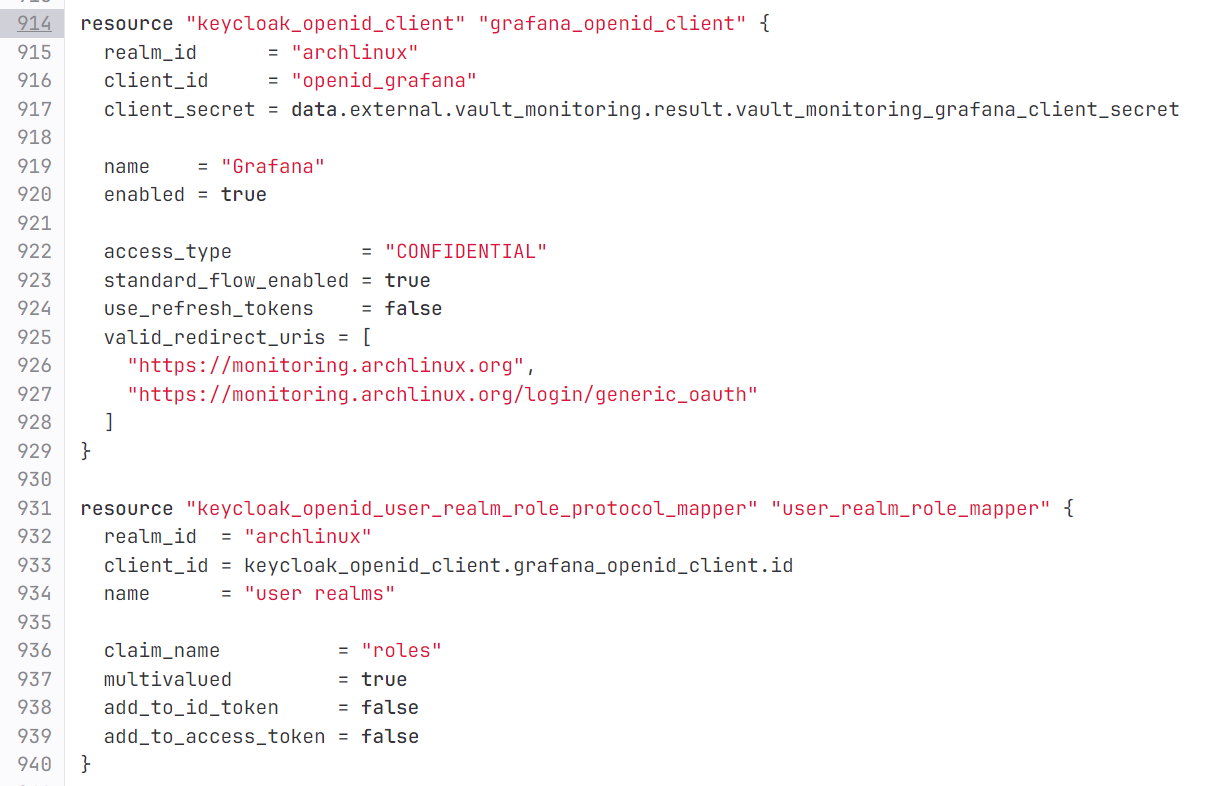
The client_secret field (line 917) actually receives a reference rather than the actual secret. This is a noteworthy practice: by using the hashicorp/external provider, sensitive information is stored in the state backend, solving the problem of how to store secrets in Terraform-based Infrastructure as Code.
Implementing Permission Management
In the Terraform OIDC configuration for security.archlinux.org:
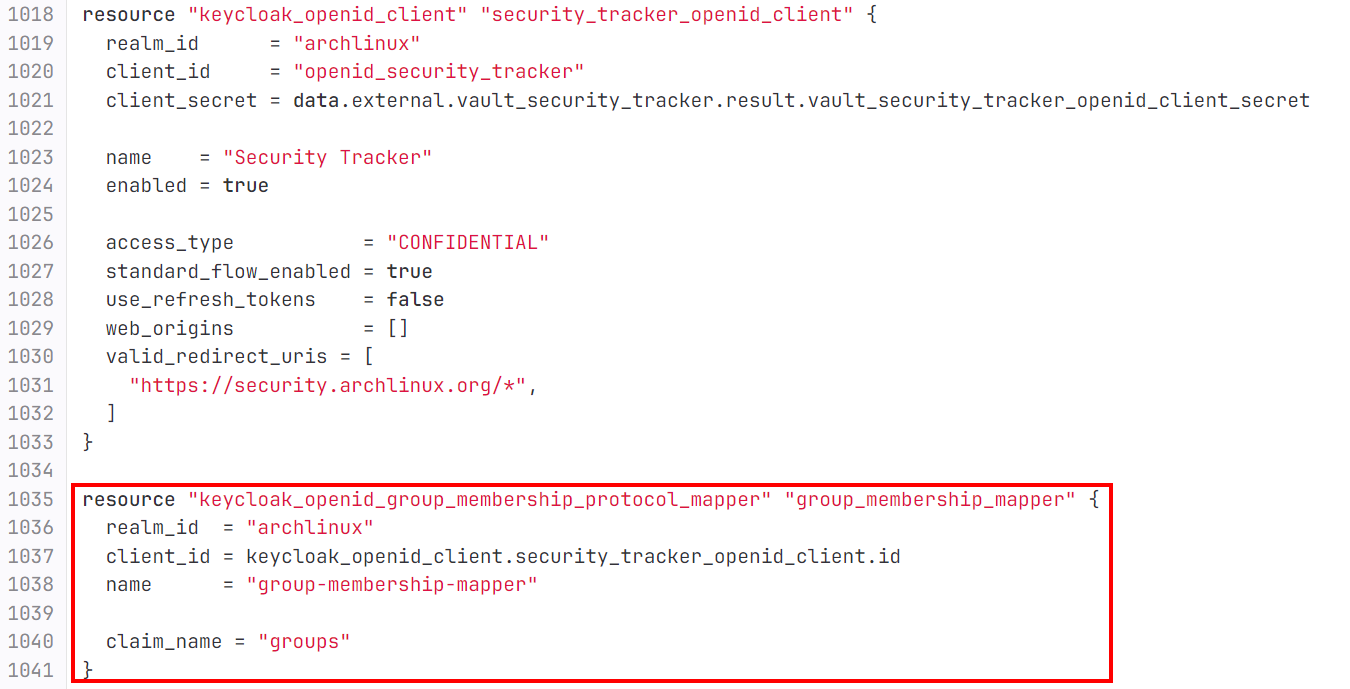
Through this Terraform code:
resource "keycloak_openid_group_membership_protocol_mapper" "group_membership_mapper" {
  realm_id  = "archlinux"
  client_id = keycloak_openid_client.security_tracker_openid_client.id
  name      = "group-membership-mapper"

  claim_name = "groups"
}
A claim is defined. Its purpose: when a user initiates an authorization code authentication via security.archlinux.org to Keycloak, Keycloak provides the user’s group membership information to the security.archlinux.org server as a key-value pair with the key groups. This way, the server can manage user permissions within the site based on Keycloak’s group information.
The value of the groups field obtained from Keycloak is an array. For example, an Arch Linux Security Team administrator’s groups field looks like this:
['/Arch Linux Staff/Security Team/Members', '/Arch Linux Staff/Security Team/Admins']
This indicates the member is both a Member and an Admin of the Security Team, corresponding to the group information defined in the Terraform code.
Below is the Python code from security.archlinux.org that implements the authorization code flow using authlib: Full code here
def sso_auth():
    # Simplified for readability
    token = oauth.idp.authorize_access_token()
    userinfo = token.get('userinfo')
    idp_user_sub = userinfo.get('sub')
    idp_groups = userinfo.get('groups')
    user_role = get_user_role_from_idp_groups(idp_groups)
    user = db.get(User, idp_id=idp_user_sub)
    if user:
        user.role = user_role
    else:
        salt = random_string()
        user = db.create(User,
                         name=idp_username,
                         salt=salt,
                         password=hash_password(random_string(TRACKER_PASSWORD_LENGTH_MAX), salt),
                         role=user_role,
                         active=True,
                         idp_id=idp_user_sub)
        db.session.add(user)
    db.session.commit()
    user = user_assign_new_token(user)
    user.is_authenticated = True
    login_user(user)
The code above implements the login flow by fetching user information from Keycloak. It queries the database using the sub (user ID) to check whether the user already exists (creating one if not), and uses groups to determine the user’s permissions.
How is authorization management implemented based on the groups information?
See the implementation of get_user_role_from_idp_groups:
# idp_groups = userinfo.get('groups')
# user_role = get_user_role_from_idp_groups(idp_groups)

def get_user_role_from_idp_groups(idp_groups):
    group_names_for_roles = {
        SSO_ADMINISTRATOR_GROUP: UserRole.administrator,
        SSO_SECURITY_TEAM_GROUP: UserRole.security_team,
        SSO_REPORTER_GROUP: UserRole.reporter
    }

    eligible_roles = [group_names_for_roles[group] for group in idp_groups if group in group_names_for_roles]

    if eligible_roles:
        return sorted(eligible_roles, reverse=False)[0]
    return None
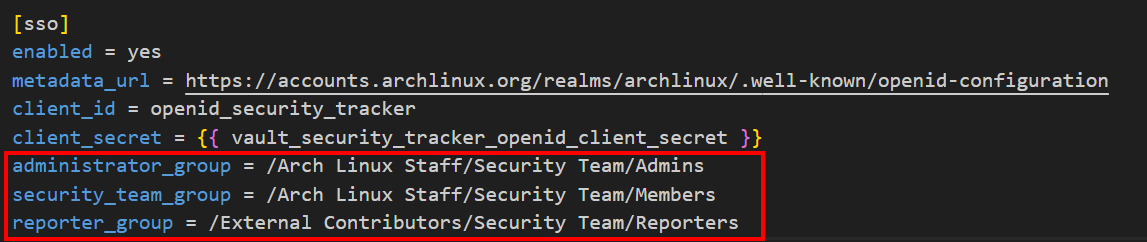
The code above defines a Python dict called group_names_for_roles. Its purpose is to map the group information strings obtained from Keycloak to enum class instances that represent permissions in the business code.
SSO_ADMINISTRATOR_GROUP, SSO_SECURITY_TEAM_GROUP, and SSO_REPORTER_GROUP are configuration values corresponding to the red-boxed content in the image below. See: Configuration file
UserRole.administrator, UserRole.security_team, and UserRole.reporter are instances of the UserRole enum class. See: Code
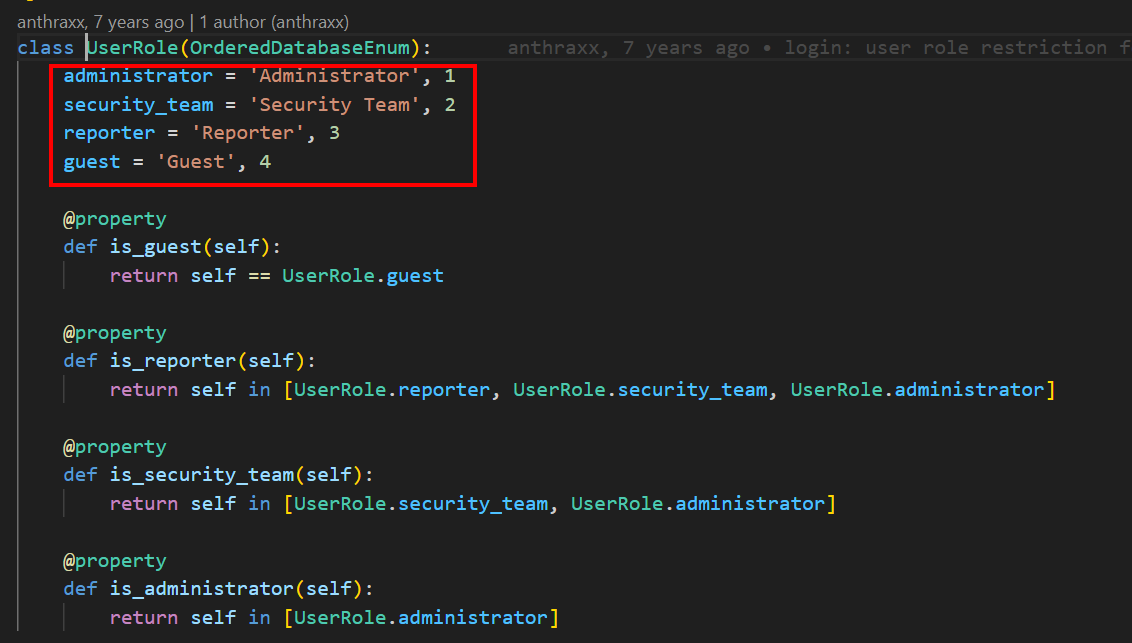
By setting the User table’s role field to the UserRole enum type (see the image below), the mapping from Keycloak groups key-value pairs to database field values is achieved.
eligible_roles = [group_names_for_roles[group] for group in idp_groups if group in group_names_for_roles]
This is a Python list comprehension. It iterates over the idp_groups array (e.g., ['/Arch Linux Staff/Security Team/Members', '/Arch Linux Staff/Security Team/Admins']), and if an element is a key in the group_names_for_roles dictionary, the corresponding enum instance is added to the eligible_roles array.
The image below shows that instead of using SQLAlchemy’s Enum type directly, the code uses a custom enhanced type. This is because the UserRole enum instances (shown above) have tuple values like 'Administrator', 1 rather than primitive types. A subclass OrderedDatabaseEnum is created by inheriting Python’s Enum type, enabling sorting based on the second member (integer) of the tuple value:
class OrderedDatabaseEnum(DatabaseEnum):
    def __init__(self, label, order):
        super().__init__(db_repr=self.name, label=label)
        self.order = order

    def __lt__(self, other):
        return self.order < other.order
This way, for a team member whose groups is ['/Arch Linux Staff/Security Team/Members', '/Arch Linux Staff/Security Team/Admins'], the enum instances mapped through get_user_role_from_idp_groups are [UserRole.security_team, UserRole.administrator]. Because UserRole’s parent class OrderedDatabaseEnum implements the __lt__ method for tuple-typed enum values, the array [UserRole.security_team, UserRole.administrator] can be sorted.
sorted(eligible_roles, reverse=False)[0]
This sorts the eligible_roles array, transforming [UserRole.security_team, UserRole.administrator] into [UserRole.administrator, UserRole.security_team], and keeps only the first element as the role representing the user’s permissions. If a team member has both regular and elevated permissions, they are considered an administrator.
In the subsequent permission-checking logic based on enum instances: 
As shown, after obtaining the enum instance representing permissions from groups, UserRole.administrator appears in the is_reporter, is_security_team, and is_administrator checks – meaning administrators have all regular permissions.
How does the business code verify user permissions? This is implemented through the permission_required decorator:
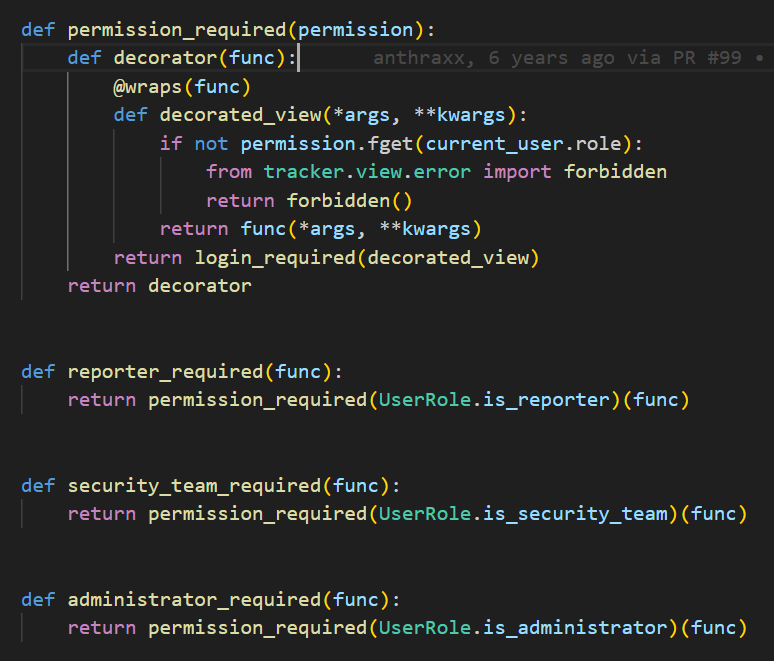
In the code above, permission_required is a decorator that returns a decorator. By passing in a specific enum class property method (i.e., is_guest/is_reporter/is_security_team/is_administrator as shown below), it returns a decorator that can be applied to view functions: 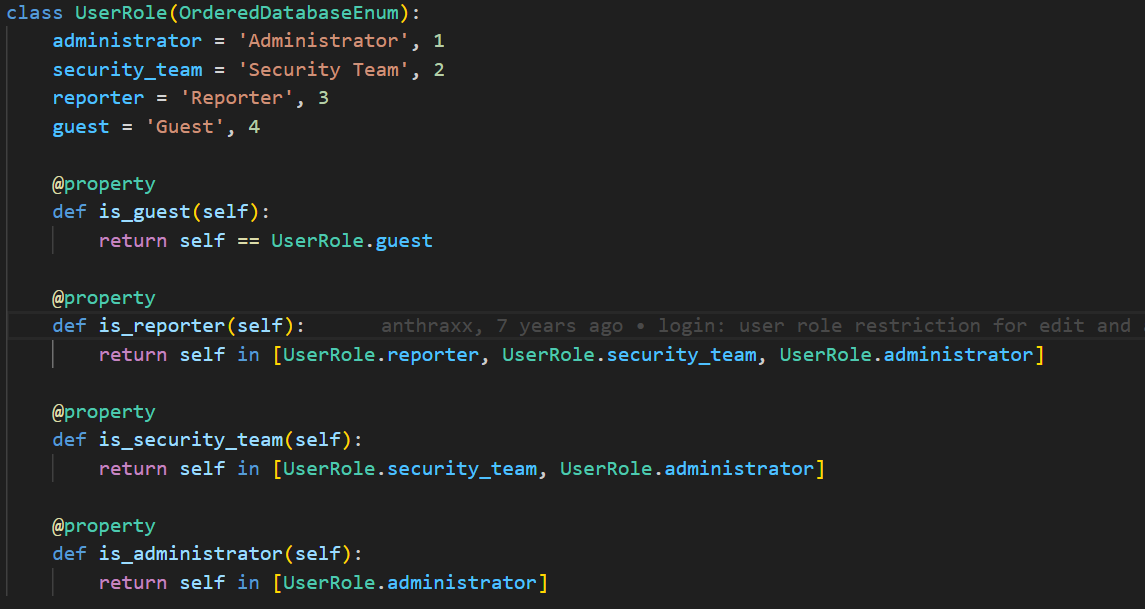
Therefore, the entire authentication flow is:
- In the infrastructure code:
- Deploy Keycloak using Ansible
- Use Terraform to manage Keycloak users, store group information, and provide OIDC integration capabilities
- Based on the OAuth2.0 and OIDC authorization code flow, configure Keycloak via Terraform to add a
groupskey-value pair containing user group information to the ID token, making it available to the business code
- In the business code:
- Convert the string information from the
groupskey-value pair into enum instances representing permissions - Check by user ID whether the user already exists in the user table; create the user if not
- Update the user’s permissions based on the
groupsinformation, i.e., assign an enum instance representing the current user’s permissions to the user’s role attribute - Finally, update the current user’s session ID and mark the user as authenticated using flask_login
- Convert the string information from the
Summary
This article covers how the Arch Linux team builds their IAM service with Keycloak via Ansible, manages user group information in the IAM service via Terraform, and implements the authentication and authorization process using Flask and SQLAlchemy.
If you are implementing OAuth2.0 and OIDC integration for your application and want good DevOps practices, the codebases referenced in this article are excellent resources:
- Infrastructure as Code repository: https://gitlab.archlinux.org/archlinux/infrastructure
- Application code repository: https://github.com/archlinux/arch-security-tracker
Additionally, the Arch Linux application code has relatively comprehensive unit tests, which is also a very good practice to reference.